How to send a payment reminder on WhatsApp without annoying the guest
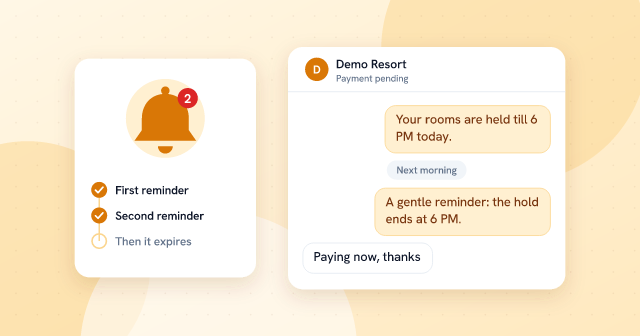
Send at most two reminders after the payment link, then release the dates and tell the guest politely. Each reminder carries the amount, the dates, the link and a deadline. The first goes out a few hours after the link, in waking hours, and the second goes out before the hold ends.

The short answer: two reminders, then release the dates
You sent the guest a quote and a booking link, you are holding the rooms, and now there is silence. The simplest rule that works is this: two reminders, then release the dates. Each reminder repeats the amount, the dates, the link and the exact deadline. After the deadline you send one closing message saying the dates are released and the guest can write again anytime.
More than two nudges usually backfires. The guest starts to feel chased, and a hold you keep extending is a room you cannot sell to someone else. A clear deadline also helps the guest, because they know exactly how long they have to decide.
This two-nudge schedule is a practice you adopt in your own hotel. It is not a SALIQ feature. You can follow it today with a phone and a WhatsApp Business number.
Where the reminder fits in a WhatsApp booking chat
A payment reminder only makes sense once you know what came before it. In a typical hotel chat, the guest asks about rooms, you quote, you confirm the dates, you hold them and you send a booking link. The reminder clock starts the moment that link goes out.
Kal 2 rooms available hain? Family of 4
Namaste! Haan, kal ke liye 2 Deluxe rooms available hain - ₹4,500/night with breakfast. Check-in kis date ko chahiye?
25 Sept, 2 nights
Perfect: 25–27 Sept, 2 Deluxe rooms, 4 guests. Booking confirm karne ke liye ₹2,700 advance UPI ya bank transfer se bhejiye - details neeche hain 👇 Payment ka screenshot yahin share kar dijiye.
- Lead captured · Room inquiry · ₹9,000
In this sample, a guest writes in Hinglish at 10:42 PM asking for 2 rooms for a family of 4. The agent quotes, confirms the dates and sends a booking link, and the lead is captured. Nobody should message the guest again that night. The guest has what they need, and your first nudge belongs in the morning.
When to send the first and second reminder
Tie both reminders to the hold, not to a fixed number of days. Decide the hold deadline first, say 6:00 PM tomorrow, and put it in the booking message. Then work backwards.
| When | Message | Tone |
|---|---|---|
| 9:30 AM next day | First nudge: amount, dates, link, deadline, offer to help | Short and helpful |
| 2:00 PM next day | Second nudge: same details, with the time left before the 6:00 PM deadline | Clear, polite, no pressure |
| After 6:00 PM | Release message: dates released, guest can write again | Warm and final |
| Never | A third nudge, or any message late at night | Not needed |
The first nudge should sound like help, not collection. Ask if they need anything, such as a different payment option or a question about the rooms. Both nudges state the deadline in plain clock time, for example 6:00 PM today, so nobody has to calculate.
If your hold is longer, for example two days, space the nudges further apart. Keep them in daytime hours, and leave the last message for after the deadline.
There is also a WhatsApp rule to plan around. As of November 2026, Meta's documentation says that when a customer messages the business, a 24-hour customer service window opens. Each new message from the customer resets it. Inside the window you can send free-form replies. Outside it, you can only send approved message templates (Meta pricing documentation). In the schedule above, the guest first wrote at 10:42 PM and the window resets with each later message, so both nudges fall inside the window. On a longer hold, the second nudge may fall outside it and need a template. We explain what to do then in how to message a customer after 24 hours on WhatsApp.
Reminder messages you can copy, in English and Hinglish
Below are three short messages for each language. The name, dates and amount are examples; replace them with your own. Replace (booking link) with your actual payment link, and reply in the language the guest wrote in. If the guest wrote in Hinglish, use the Hinglish set.
| Message | Wording |
|---|---|
| First nudge | Hi Mr Kapoor, your 2 rooms for 14-15 Dec are on hold until 6:00 PM today. The advance of ₹8,400 can be paid here: (booking link). If you have any question, just reply and we will help. |
| Second nudge | Reminder: your 2 rooms for 14-15 Dec stay on hold until 6:00 PM today, 4 hours from now. Advance ₹8,400: (booking link). After that we will release the dates. |
| Release | Hi Mr Kapoor, we have released the 14-15 Dec dates as we did not receive the advance. If you still want to stay, write to us anytime and we will check availability. |
| Message | Hinglish | Meaning |
|---|---|---|
| First nudge | Kapoor ji, aapke 14-15 Dec ke 2 rooms aaj shaam 6:00 baje tak hold par hain. ₹8,400 advance yahan de sakte hain: (booking link). Koi sawal ho toh reply kar dijiye. | Your 2 rooms for 14-15 Dec are on hold until 6:00 PM today. Pay the ₹8,400 advance here. Reply if you have a question. |
| Second nudge | Yaad dilana tha: 14-15 Dec ke 2 rooms aaj shaam 6:00 baje tak, yaani 4 ghante tak hold par hain. Advance ₹8,400: (booking link). Uske baad dates release ho jayengi. | A reminder: the rooms are held until 6:00 PM today, 4 hours from now. After that the dates are released. |
| Release | Kapoor ji, advance nahi mila, isliye 14-15 Dec ki dates release kar di hain. Dobara room chahiye toh kabhi bhi likhiye, hum availability dekh lenge. | We released the dates as the advance did not arrive. Write anytime and we will check availability. |
Things to avoid in any reminder:
- All capital letters, or words like URGENT or LAST CHANCE.
- Threats or guilt, such as saying you turned away other guests for them.
- Pasting the same link again with no context, with no dates or amount.
- Sending the same text twice. If the first nudge got no reply, the second should say something new, such as how many hours are left and what happens to the dates after the deadline.
- Adding an offer or discount to the reminder. It reads like pressure, and it can change how Meta classifies the template (more on that below).
When to stop nudging and have a person step in
A third message is rarely the right move. If the guest has gone quiet, a person is usually better than another nudge. Hand the chat to a teammate in these cases:
- The guest asks something the link does not answer: a group discount, a date change or paying only part of the advance.
- The guest says they have paid but you see nothing, or sends a screenshot that needs checking.
- The guest is high-value or a repeat visitor. A short phone call works better than a third message.
- The guest asks you to stop. WhatsApp's Business Policy says you must respect requests to block, discontinue or opt out of communications from you.
If an AI agent handles your first replies, make sure a human can step in easily. The same policy page says automation within the 24-hour window is fine as long as there are prompt, clear and direct escalation paths, meaning the customer can reach a person. SALIQ runs agents on WhatsApp with a shared team inbox, where a teammate can take over any conversation. Decide who watches that inbox so a guest who writes back with a problem is not left waiting.
Turning a reminder into a confirmed booking
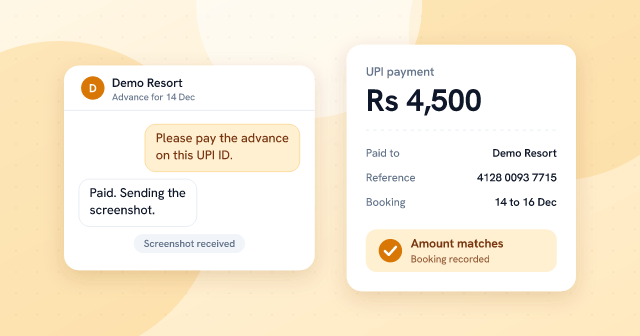
When the guest says they have paid, verify the payment before you confirm. Do not rely on a screenshot alone. Our post on taking and verifying UPI payment on WhatsApp covers the checks.
Once you have verified it, send one confirmation message and nothing more. Include the dates, the number of rooms, the amount received and the check-in time. A complete confirmation means the guest needs no further reminders and has no reason to ask again.
If you use eZee Absolute, SALIQ connects to it with your eZee Hotel Code and Auth Code. Once your team verifies the guest's UPI or bank payment in SALIQ, the booking is written into eZee as a confirmed reservation. You can read the details on the eZee Absolute integration page.
What Meta's rules mean for reminder templates
If a reminder has to go out as a template, Meta's category rules apply. Meta's template categorisation guidelines give a payment reminder as an example of a utility template: a reminder that a monthly payment will be billed on a date. A utility template must be non-promotional and specific to the user's own order, account or transaction.
The same page says account alerts should not promote, recommend, upsell or cross-sell, include offers or try to secure renewals. Mixed content, such as a payment reminder with a promotion added, can be treated as marketing. Meta also says its examples are illustrative and a template can be categorised differently depending on its exact wording. So keep reminder text plain: the dates, the amount, the link and the deadline.
Cost is the other thing to know. As of November 2026, Meta's pricing update page says that from 1 October 2026 utility templates sent inside an open 24-hour window are charged, and so are free-form (non-template) replies. Utility templates had been free inside the window since 1 July 2025. So you should not assume any reminder sent inside the window costs nothing. Meta charges for delivered messages, and rates vary by market and message category. We could not confirm the current India rate for utility templates from Meta's own pages, so we are not quoting one. Check the rate on Meta's pricing page.
The practical point is simple: fewer, better reminders mean fewer charged messages, whether they go out as templates or as free-form replies. On SALIQ, WhatsApp template messages are deducted from prepaid service credits, itemised, and you can see how that works on the pricing page.
Frequently asked questions
How many payment reminders should I send on WhatsApp?
Two at most, followed by one closing message once the hold has ended. A third nudge tends to make the guest feel chased. If the guest is still silent and the booking is valuable, a short phone call is better than another message.
Can I send a payment reminder after 24 hours on WhatsApp?
As of November 2026, Meta's documentation says that outside the 24-hour customer service window you can only send approved message templates. Inside the window you can send normal messages. See our post on messaging a customer after 24 hours for the details.
Is a WhatsApp payment reminder a utility or a marketing template?
Meta's template guidelines give a payment reminder as a utility example, provided it is non-promotional and specific to the guest's own transaction. If you add an offer or an upsell, it may be treated as marketing. Meta also says its examples are illustrative, so wording matters.
Does Meta charge for a payment reminder sent inside the 24-hour window?
Yes. As of November 2026, Meta's pricing update page says that from 1 October 2026 both utility templates and free-form (service) messages sent inside an open window are charged. We could not confirm the India rate from Meta's own pages, so check Meta's pricing page for the current figure.
What should I do if the guest says they have paid but I see nothing?
Stop sending reminders and have a person handle it. Ask for the payment reference or a screenshot, check it against your bank or UPI records, and only then confirm the booking.
Sources
Keep reading
 Payments
How to take UPI payment on WhatsApp and verify it
Share your UPI details, wait, check the credit in your own bank app, then confirm the room in writing. A routine your front desk can follow from tomorrow.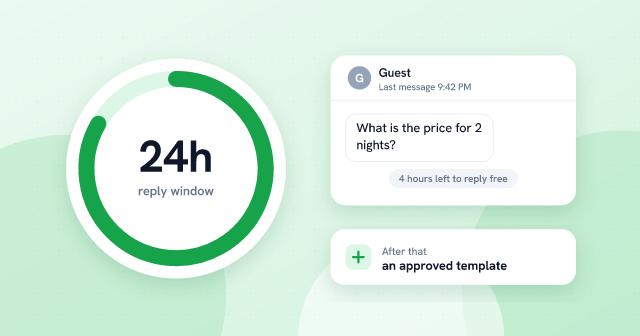 WhatsApp
How to message a customer after 24 hours on WhatsApp
Count the 24-hour WhatsApp window correctly, write a follow-up template Meta can approve, and know what a follow-up costs since 1 October 2026. Instagram
How to auto reply to Instagram DMs and sound human
A practical guide to automatic Instagram DM replies that answer the actual question, work in Hinglish and know when to hand over to a person.Get started now. Live in minutes.
Put an AI agent on your WhatsApp, Instagram and website, and let your team take over any chat.