How to get direct hotel bookings on WhatsApp instead of through OTAs
A direct WhatsApp booking is won in four places: guests can find your number, get a fast and complete reply (even at night), get one clear next step, and get a polite follow-up if they go quiet. This post walks that path using a sample 10:42 PM Hinglish enquiry. It promises no extra bookings, only a clear look at where enquiries can slip away.

The short answer: four places a direct WhatsApp booking is won or lost
Guests already message hotels on WhatsApp, often after the front desk has closed. Whether that chat becomes a booking paid straight to your property depends on four things, and a weak link in any one of them can send the guest back to an OTA.
- Findable: the guest can reach your WhatsApp number from the places they already look, with one tap.
- Fast and complete: the first reply comes quickly, including at night, and holds everything the guest needs to decide.
- One clear next step: a booking link, or payment details, not a list of options.
- Gentle follow-up: a guest who went quiet gets one or two polite nudges, sent within Meta's rules.
Here is why it matters. An OTA booking carries a commission to the OTA, and the rate sits in your own contract with them. We are not quoting a percentage here, because we did not find a reputable non-vendor source for India that we could cite. Check your own OTA statements for the real figure.
One more thing up front: nothing below guarantees more bookings. It describes what happens at each step, so you can see where your current process leaks.
Where to put your WhatsApp number so guests message you first
The easiest thing to share is a click-to-chat link. WhatsApp's Help Center, as of November 2026, says the format is https://wa.me/ followed by your full phone number in international format. Do not use a plus sign, leading zeros, brackets or dashes in the number.
You can also pre-fill the guest's first message by adding ?text= and the message, URL-encoded (spaces become %20). A link like https://wa.me/91XXXXXXXXXX?text=Hi%20I%20want%20to%20check%20room%20availability opens a chat with that line already typed. Always include your number: WhatsApp notes that a link with only text and no number makes the guest pick a contact themselves.
Put that link, or a QR code of it, in every place a guest decides:
- Your website header and booking page, as a visible 'Check availability on WhatsApp' button.
- Your Google Business Profile, if the option is available to you (steps below).
- Your Instagram profile, through the WhatsApp button (steps below).
- A QR code at reception, so walk-in and in-house guests can message you.
- A QR code printed on the checkout bill, so the next trip starts with a chat to you.
- Open your Business ProfileYour Google Business Profile must be claimed and verified. Go to your profile and click Edit profile, then Contact.
- Edit the Chat optionClick the pencil icon next to Chat and choose WhatsApp from the drop-down.
- Paste your click-to-chat linkPaste the wa.me link into the URL field.
This follows Google's help page and WhatsApp's matching guide. Google says that if you add both WhatsApp and text message, customers see only the text-message option. We could not confirm from these pages, as read in November 2026, which countries get this option, so check whether Chat appears in your own profile before planning around it.
For Instagram, WhatsApp's help page says you link your professional Instagram account to your WhatsApp Business account from the Facebook & Instagram screen in the WhatsApp Business app. That turns on a Click to WhatsApp button on your profile.
A caution on OTA guests: before you send contact details or promotions to someone who booked through an OTA, read your contract with that OTA. We are not stating any OTA's policy here, because it differs and changes. Your contract is the authority.
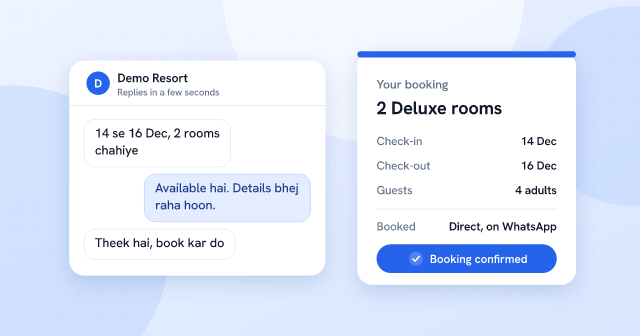
A sample 10:42 PM enquiry, answered in Hinglish and sent to a booking link
This is a moment a direct booking can be lost. A family planning a trip messages at 10:42 PM and nobody is at the desk. By morning they may have opened an OTA and booked there.
Kal 2 rooms available hain? Family of 4
Namaste! Haan, kal ke liye 2 Deluxe rooms available hain - ₹4,500/night with breakfast. Check-in kis date ko chahiye?
25 Sept, 2 nights
Perfect: 25–27 Sept, 2 Deluxe rooms, 4 guests. Booking confirm karne ke liye ₹2,700 advance UPI ya bank transfer se bhejiye - details neeche hain 👇 Payment ka screenshot yahin share kar dijiye.
- Lead captured · Room inquiry · ₹9,000
In this sample, the guest asks in Hinglish for 2 rooms for a family of 4. The agent quotes, confirms the dates and sends a booking link, and the lead is captured. It is a sample conversation for a demo resort, not a real guest or property.
Hinglish is how many guests really write. A line like 'Kal room milega?' means 'Will a room be available tomorrow?' A reply in English to that guest still works, but a reply in the guest's own style feels like talking to the hotel, not filling a form.
- It replies while the front desk is closed. The guest gets an answer at 10:42 PM, not at 9 AM.
- It matches the guest's language. SALIQ replies in whatever the guest writes in: English, Hindi or Hinglish.
- It gets dates and occupancy right in the quote. A price for the wrong dates or the wrong number of people only creates a second round of messages.
- It ends with a next step. The guest leaves the chat holding a link, not a question.
What a reply that turns into a booking must contain
A good reply answers the questions the guest would otherwise have to ask one by one. Each missing item is another message, and another chance for the guest to give up or open an OTA.
| Item | What to include | Why it matters |
|---|---|---|
| Dates and nights | Check-in, check-out and number of nights, repeated back to the guest | Catches wrong dates before a quote is sent |
| Room type and occupancy | Room category, number of rooms, adults and children | A family of 4 may need 2 rooms or one family room |
| Rate per night | The price, and whether taxes are included | Prevents a surprise at checkout |
| Inclusions | What comes with the rate, such as breakfast or other meals | Lets the guest compare fairly with an OTA listing |
| Cancellation policy | Your rule in one or two plain lines | Answers the question guests ask before paying |
| One next step | A single booking link, or payment details | Gives the guest a clear thing to do now |
Compare two replies. The first: 'Rooms available, please call.' The guest must now phone a closed desk, or give up. The second: 'For 12 to 14 December, 2 nights, 2 rooms for 4 guests: ₹X per night per room, taxes included, breakfast included. Free cancellation until [date]; after that, [your rule]. Book here: your booking link.' The guest can say yes immediately.
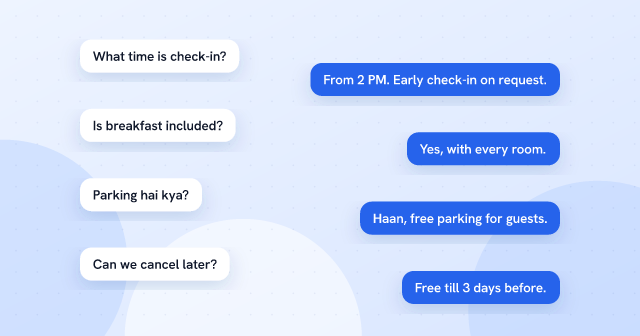
The second reply takes longer to write, which is why it is worth saving as a ready reply or having an agent send it. For ready-made answers to the other questions guests ask, such as check-in times, pets and parking, see our guide to hotel WhatsApp replies.
Taking payment and confirming the booking on WhatsApp
Give the guest one payment step. That is either a booking link, or your UPI or bank details. Offering three methods in one message makes the guest stop and choose.
Then verify the payment before you confirm. A guest's screenshot is not the same as money in your account. Confirm the room only after your team has checked the payment, and tell the guest that is what is happening: 'Payment check ho raha hai, confirmation thodi der mein.' (We're checking your payment; you'll get confirmation shortly.)
If you use eZee Absolute as your property management system, SALIQ connects to it with your eZee Hotel Code and Auth Code. The agent then answers WhatsApp guests from the rooms free and the prices eZee shows. Once your team verifies the guest's UPI or bank payment in SALIQ, the booking is written into eZee as a confirmed reservation. The eZee Absolute integration page has the details.
Following up enquiries that went quiet, and bringing repeat guests back
Many guests ask for a quote and then say nothing. That is normal, since they may be waiting for family to agree. A polite nudge helps, but WhatsApp has rules about when you can send one.
As of November 2026, within 24 hours of the guest's last message you can reply normally. After that, WhatsApp requires an approved template message; how to message a customer after 24 hours on WhatsApp explains the rule in detail.
Keep follow-ups short and send at most one or two. If you want to message the guest later, get opt-in that meets Meta's requirements, described below. A good nudge is a question, not pressure: 'Aapke dates abhi bhi available hain. Kya main aapke liye rooms hold kar dun?' (Your dates are still available. Shall I hold the rooms for you?)
For repeat guests, the time to ask permission is checkout. Meta's opt-in requirements, last updated 3 November 2025, say a business must get opt-in before messaging people on WhatsApp. The guest must give their mobile number and confirm they want to hear from your business. Meta lists three requirements (the first three below) and gives tips (the last two):
- Clearly say the person is opting in to receive messages.
- Clearly name your hotel as the sender.
- Follow applicable law.
- Get opt-in for each type of message you plan to send, such as seasonal offers.
- Explain how to opt out, and act on opt-out requests.
Meta accepts several methods, including SMS, a website, an automated phone menu and in person or on paper. So a clearly worded line on the checkout form, or a box the guest ticks themselves on your website, can work if it meets the three requirements above.
Meta also says it may limit how many messages a business can send if its quality stays low for a long time, and guests can block or report a business. Sending offers only to guests who agreed is both the rule and the safer habit.
When a person should take over the booking chat
An agent handles the routine enquiry well. Some chats need a human, and the guest should reach one without having to ask twice.
- Group bookings and wedding blocks, where rooms, dates and rates are negotiated.
- Requests for a special rate or discount.
- Complaints, from current or past guests.
- Payment disputes, such as a guest who says they paid but your team cannot see it.
With SALIQ, your team takes over any conversation from the shared inbox. For a fuller look at when and how to hand over, read when a chatbot should hand over to a human.
Frequently asked questions
Do I need a separate WhatsApp number for the hotel?
It is wise to: use a dedicated number for the hotel rather than a staff member's personal phone, one guests will recognise and that you will keep for years. SALIQ runs the agent on your WhatsApp Business number, so choose a number you are comfortable putting on your website, Google profile and bills.
Can I add my WhatsApp link to my Google Business Profile?
Google's help page describes adding WhatsApp under Chat in a claimed and verified Business Profile, by pasting your click-to-chat link. We could not confirm from the pages we read which countries get this option, so check whether Chat appears in your own profile.
Can I message guests who booked on an OTA?
Check your contract with that OTA first, as terms differ. Separately, Meta requires opt-in before a business messages someone on WhatsApp, so ask permission and name your hotel clearly.
How many follow-up messages are too many?
Send one or two polite nudges to a quiet enquiry, then stop. As of November 2026, once 24 hours have passed since the guest's last message, a nudge has to be an approved template message; see our guide on messaging a customer after 24 hours for the details.
Sources
Keep reading
 Hotels & bookings
Hotel WhatsApp replies to guest questions: 10 ready ones
Ten common hotel guest questions with a sample reply for each, Hinglish versions, app steps to save quick replies, and what still needs a person.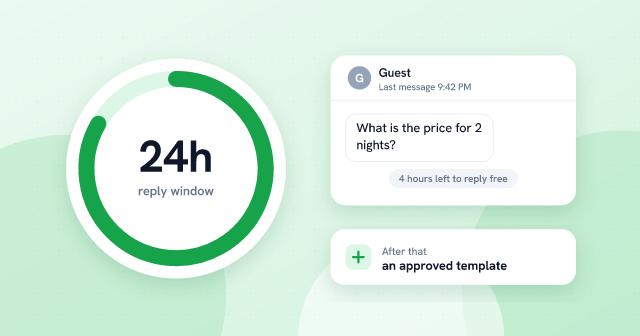 WhatsApp
How to message a customer after 24 hours on WhatsApp
Count the 24-hour WhatsApp window correctly, write a follow-up template Meta can approve, and know what a follow-up costs since 1 October 2026.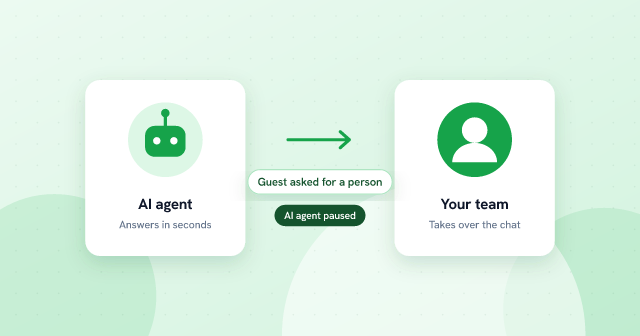 WhatsApp
When Should a Chatbot Hand Over to a Human on WhatsApp?
A practical list of when an AI agent on WhatsApp should pass the chat to your team, with Hinglish examples, a sample handover and a setup checklist.Get started now. Live in minutes.
Put an AI agent on your WhatsApp, Instagram and website, and let your team take over any chat.