How to take salon appointment bookings on WhatsApp, with ready replies
Answer the price question first, offer two specific slots, collect the same few details every time and confirm in one message the client can screenshot. You can do all of this by hand in the WhatsApp Business app. An AI agent helps when messages arrive faster than your staff can reply, or after closing time.

The short answer: how to take salon bookings on WhatsApp
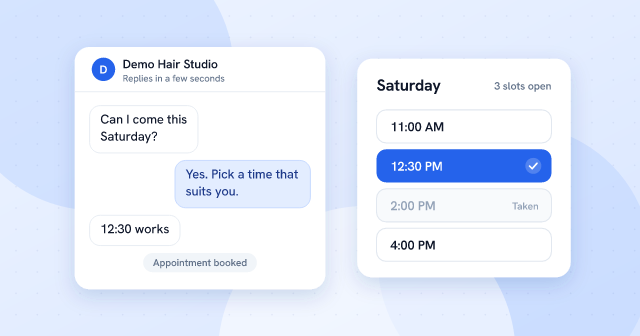
Many salon chats start with a price question: 'Hair spa ka price kya hai?' (How much is a hair spa?) If you reply with only the price, the client has nothing to answer. If you reply with the price and two specific slots, the client has an easy choice to make.
The routine has four parts. Answer the question, then offer two slots, such as 'tomorrow 4 PM or Saturday 11 AM', instead of asking 'when are you free?'. Collect the same few details every time. Confirm in one message. Keep reminders for later, and keep them few.
The WhatsApp Business app is enough to run this by hand. The limit is people: someone has to read every message, reply and note down every booking, including the ones that arrive at 11 PM when the salon is shut. This post does not promise more bookings. It shows what to do with the messages you already get.
The details every booking message needs before you confirm
A booking that is missing one detail turns into three follow-up messages and a confused client on Saturday. Decide the list once and ask for whatever is missing in a single message.
- The service, and its length if the name is not enough. A haircut and a hair spa take very different time on a chair.
- The date and time, with one backup time if your chairs fill up.
- Stylist preference, if you have more than one stylist. 'Koi bhi chalega' (anyone is fine) is a valid answer.
- The client's name, as you will write it in your booking list.
- The phone number, if the chat is not already on the number they will use.
Ask for what is missing in one message, not five. For example: 'Aapka naam aur kaunsi service chahiye, bata dijiye.' (Please tell me your name and which service you want.) One short question gets a faster answer than a list of questions.
Then send the confirmation as one reply the client can screenshot. Include the service, date, time, stylist and your address. A working format: 'Booking confirmed: Hair spa, Saturday 14 Nov, 11:00 AM, with Neha. Address: [your salon address]. Please message us if you need to change the time.'
If you take an advance for long services such as bridal packages, say so in the same confirmation: the amount, and that the slot is held once it is paid. Our post on how to take UPI payment on WhatsApp covers that step.
Ready replies for the messages salons get most, in English and Hinglish
Copy these, put in your own prices and times, and save them somewhere you can paste from quickly, such as a notes app on the phone. Each reply is three lines or fewer. The English line is the meaning of the Hinglish line next to it, so you can use either. Replace ₹X with your price.
| Situation | Hinglish reply | English meaning |
|---|---|---|
| Price question: 'Hair spa ka price kya hai?' (How much is a hair spa?) | Hair spa ₹X se shuru hota hai, lagbhag 60 minute lagte hain. Kal 4 baje ya Saturday 11 baje slot hai, kaunsa chalega? | Hair spa starts at ₹X and takes about 60 minutes. We have a slot tomorrow at 4 PM or Saturday at 11 AM. Which suits you? |
| Slot question, slot free: 'Kal 4 baje slot milega?' (Can I get a slot tomorrow at 4?) | Ji, kal 4 baje slot khaali hai. Aapka naam aur service bata dijiye, main confirm kar deti hoon. | Yes, 4 PM tomorrow is free. Please tell me your name and the service, and I will confirm. |
| Slot question, slot taken | Kal 4 baje slot full hai. 3 baje ya 5:30 baje chalega? | The 4 PM slot tomorrow is full. Would 3 PM or 5:30 PM work? |
| Reschedule request | Koi baat nahi. Aap kaunsa naya din aur time chahenge? Hum slot aapke naam par shift kar denge. | No problem. Which new day and time would you like? We will move the slot under your name. |
| Cancel request | Theek hai, slot cancel kar diya hai. Jab bhi dobara aana ho, bas message kar dijiye. | Okay, the slot is cancelled. Message us whenever you want to book again. |
| Message after closing time | Namaste, salon abhi band hai aur subah 10 baje khulta hai. Aap service bata dijiye, kal 11 baje ya 2 baje ka slot de sakte hain. | Hello, the salon is closed now and opens at 10 AM. Tell us the service, and we can offer a slot tomorrow at 11 AM or 2 PM. |
Two small rules make these work. Always give a real number for the price, or 'starts at', never 'DM for price'. And in the reschedule and cancel replies, stay friendly. A polite reply to a cancellation leaves the door open for the next booking.
If many of your clients write in Hinglish, a Hinglish WhatsApp chatbot can reply in English, Hindi or Hinglish, whichever the client writes in, but the lines above work fine by hand.
Setting up the WhatsApp Business app for appointments
The profile, away-message and catalog steps come from WhatsApp's own help pages, as checked on 12 November 2026. The profile and away-message steps are the Android versions and the catalog steps are the Web version, so menus on iPhone may look different. WhatsApp's pages describe first-time profile setup. Where to edit an existing profile later may differ.
- Fill in your business profile with hours and addressOn first setup on Android, enter a business name and select up to three business categories. You cannot create a custom category. Then add your business hours, a business address and a description, as set out on WhatsApp's page on how to download the WhatsApp Business app. Clients can then see your name, description, address, hours and category, plus the month and year you joined the app, as WhatsApp describes here.
- Set an away message for after closing timeOn Android, go to the Tools tab and tap Away message. Turn on Send away message, tap the message to edit it, then tap OK. Under Schedule you can choose Always send, Custom schedule or Outside of business hours. The last option appears only after you have set business hours in your profile. Under Recipients, choose who receives it. See WhatsApp's page on how to use away messages.
- Write the away message so it still offers a slotUse the after-hours reply from the table above: when you open, and a request to send the service name so you can offer a slot first thing. An away message that only says 'we are closed' gives the client nothing to reply to.
- List your services with prices in the catalogOn WhatsApp Web, click More Options (three dots), then Catalog, then Add new item. You can upload up to 10 images, and you must enter a name and a country of origin. Price and description are optional. Click Add to catalog. WhatsApp reviews every image against its Business Messaging Policy, and customers see an item only after it is approved. Details are on WhatsApp's page on how to create and maintain a catalog.
- Keep one booking listUse a diary or a shared sheet. The moment you send a confirmation, write the booking down with service, date, time, stylist and name. The chat list is not a calendar, and bookings buried in it are the ones that get missed.
Be honest about the limit. The app is manual: someone still has to read each message, reply and update the booking list. That is fine for a few enquiries a day. It gets hard when enquiries pile up during a rush or arrive after everyone has gone home.
A sample conversation: from a price question to a booked Saturday consultation
Here is what the whole flow looks like end to end. This is a sample conversation with a demo business, not a real customer. A client asks about a product, gets the price and ends with a confirmed Saturday consultation.
Do you have 24 inch clip-in extensions?
Yes! 24" clip-ins in natural black and dark brown, starting ₹3,200. Would you like a free consultation at the studio to match your shade?
Yes, Saturday if possible
Saturday 11:30 AM is open - shall I book it?
Book it
- Appointment confirmed · Sat 11:30 AM
In this sample, the agent answered the client's question with the price and then booked the Saturday consultation in the same chat. This is the moment you handle by hand today: a question, a price and a booked slot, all in one chat.
Treat it as a sample of the conversation, not a promise about calendars. Keep your own booking list as the record of which slots are taken.
Sending reminders and handling reschedules after the chat goes quiet
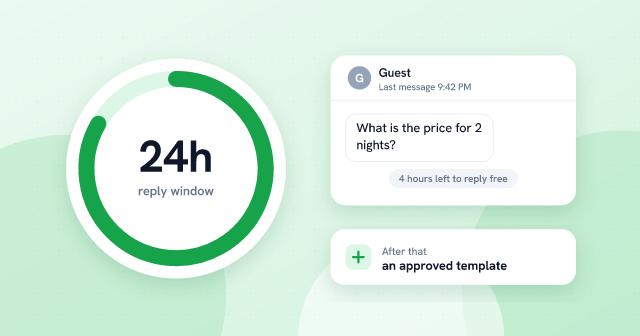
Reminders are where the rules change. On the WhatsApp Business Platform, which businesses use through the API, a customer message or call starts a 24-hour customer service window. Inside it, you can send free-form messages. After it closes, Meta's documentation says the business can only send pre-approved template messages (as checked on 12 November 2026). That rule is for the Platform, not for the WhatsApp Business app.
In plain words: if a client booked on Monday and you want to remind them on Friday, a typed message is not enough on the Platform. You need a template that Meta has approved. Our post on messaging a customer after 24 hours on WhatsApp explains how to handle that, so it is not repeated here.
Whatever tool you use, keep the reminders to one. Send one reminder the day before, with the service, time and a line like 'Reply to reschedule'. A chain of nudges is more likely to annoy a client than help. If the client replies to the reminder wanting a new time, the window opens again and you can use the reschedule reply from the table.
When a stylist or the owner should take over the chat
Some messages should never be answered from a saved reply. Hand these to a stylist or the owner:
- Complaints about a service or a stylist.
- Questions about allergies or skin reactions, before or after a service.
- Bridal or group quotes, where the price depends on people, time and the day.
- Anything about a refund.
Tell the client what is happening. Send a short, honest message such as 'Aapki baat hamari senior stylist ko bhej di hai, woh kuch minute mein reply karengi.' (We have passed your message to our senior stylist, who will reply in a few minutes.) Do not go silent. A client who is told who will reply and roughly when waits calmly. A client who gets silence after a complaint does not.
With SALIQ, taking over also works from your phone. The SALIQ app for Android is free on Google Play. It shows the conversations your agent is handling, and you can step in, reply and hand the chat back from anywhere.
Frequently asked questions
Can I take salon bookings on WhatsApp by hand?
Yes. In the WhatsApp Business app you can set up a business profile with hours and address, an away message and a catalog. You still have to reply and track every booking yourself.
What should I send when a client asks for the price?
Give the price, or a 'starts at' price, and offer two specific slots in the same message. For example: 'Hair spa starts at ₹X and takes about 60 minutes. We have tomorrow 4 PM or Saturday 11 AM.'
Can I send a reminder a few days after the client last messaged?
On the WhatsApp Business Platform (API), not as a free-form message once 24 hours have passed. As of November 2026, Meta's documentation says the business can then send only pre-approved template messages. That rule applies to the Platform, not to the WhatsApp Business app.
Can I reply to clients in Hinglish?
Yes. Many clients write that way. The replies in this post come with English meanings. SALIQ's agent replies in whichever of English, Hindi or Hinglish the client writes in.
Sources
Keep reading
 WhatsApp
How to message a customer after 24 hours on WhatsApp
Count the 24-hour WhatsApp window correctly, write a follow-up template Meta can approve, and know what a follow-up costs since 1 October 2026. Payments
How to take UPI payment on WhatsApp and verify it
Share your UPI details, wait, check the credit in your own bank app, then confirm the room in writing. A routine your front desk can follow from tomorrow. Hotels & bookings
How to Avoid Double Booking in a Hotel (WhatsApp, Phone)
A front-desk routine for hotels that sell rooms on WhatsApp and phone, with guest-facing lines in English and Hinglish and a plan for the first hour after a clash.Get started now. Live in minutes.
Put an AI agent on your WhatsApp, Instagram and website, and let your team take over any chat.