How to get WhatsApp templates approved in the right category: hotel examples
Give every template one purpose and pick the category Meta would pick. A confirmation stays utility only without an offer; add '10% off spa' and it is marketing. As of November 2026, Meta charges for utility templates in the 24-hour window, so category affects your bill.

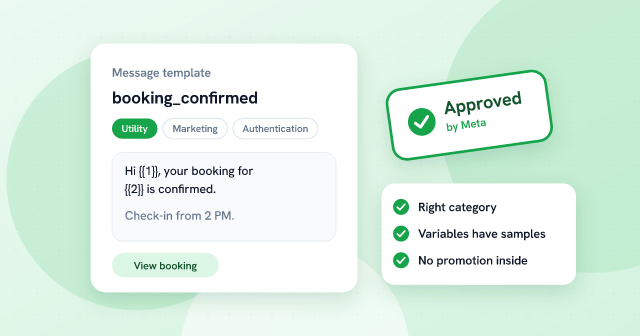
The short answer: one purpose per template, in the category Meta would pick
Meta reviews every template and checks its category against its own rules for marketing, utility and authentication, as described, as of November 2026, on its Template categorization page. The rule hotels most need to know is simple: a template that mixes a transactional update with a promotion counts as marketing. Meta's own examples are an order update with a promo, or a feedback survey with promotional content.
The other common cause of trouble is formatting, mainly variables placed badly or too many variables for the message length (see Meta's Template review page). The category matters for money too. As of November 2026, Meta's pricing notice says that from 1 October 2026 it charges for service messages and for utility messages sent inside an open 24-hour window, both of which were free before.
What you can do today:
- List every template your hotel uses and mark each one as confirmation, receipt, check-in info, change of booking, offer, survey or code.
- Find any template that does two jobs, for example a confirmation that ends with an offer.
- Split it: keep the transactional text in one template and move the offer to a separate marketing template.
- Resubmit the edited template, or request a category review if Meta has already moved it (steps below).
What utility, marketing and authentication mean for a hotel
Meta's Template categorization page describes marketing templates as those that help a business reach goals from generating awareness to driving sales and retargeting customers. Its own sample is a hotel-style line, 'Our newest resort just opened in {{location}}'. For a hotel, that covers offers, festive packages, 'come back' messages and upsells such as a spa discount.
Utility templates follow up on something the guest did or asked for. Per the same page, as of November 2026, a utility template has to pass two tests. It must be non-promotional, with no promotional or persuasive intent. And it must be either specific to the guest or requested by them (their booking, account or transaction), or essential to them, such as a safety message. Meta adds that order and account messages should not promote, recommend, upsell or cross-sell, include offers, or try to secure renewals.
- Utility for a hotel: booking confirmation, payment receipt, check-in time and directions for a booked stay, a change to an existing booking.
- Marketing for a hotel: festive packages, discounts, win-back messages, spa or dining upsells, new-property announcements.
- Authentication: verifies a person's identity, usually with a code.
Authentication is narrow. Meta says only authentication templates may send one-time passcodes, and you must use templates from Meta's Template Library with a one-time-password button (copy-code or one-tap). URLs, media and emojis are not allowed, and each variable is limited to 15 characters. Most hotels never need this category.
Two more rules from the same page are worth remembering. A template whose content is unclear, such as only '{{1}}' or 'Congratulations!', is treated as marketing. And a general feedback survey will not be approved as utility; Meta's approved example asks about a specific recent visit at a specific location, not about the business in general.
Hotel template wordings sorted by category
The table below sorts sample hotel wordings by the category Meta is likely to assign. These are our own examples written against Meta's published rules, not a guarantee; Meta makes the final call and can change a category later. The samples use {{1}}-style variables and 'a demo resort' as the business. None of them starts or ends with a variable, because Meta lists that as a rejection reason.
| Purpose | Sample wording | Likely category | Why |
|---|---|---|---|
| Booking confirmation | Hello {{1}}, your booking {{2}} at a demo resort is confirmed from {{3}} to {{4}}. Thank you. | Utility | Specific to the guest's own booking. No promotion. |
| Confirmation plus spa offer | Hello {{1}}, your booking {{2}} at a demo resort is confirmed from {{3}} to {{4}}. Enjoy 10% off at our spa this week. | Marketing | The offer line adds promotional intent. Mixed content counts as marketing. |
| Fixed version of the pair above | Hello {{1}}, your booking {{2}} at a demo resort is confirmed from {{3}} to {{4}}. Thank you. | Utility | One purpose. Send the spa offer as its own marketing template. |
| Payment receipt | Hello {{1}}, we received ₹{{2}} for booking {{3}} at a demo resort. Your receipt number is {{4}}. Thank you. | Utility | A transaction the guest made. States facts only. |
| Check-in details (Hinglish) | Namaste {{1}}, aapka check-in {{2}} ko dopahar 2 baje se hai. Reception ka number {{3}} hai. Dhanyavaad. (English: your check-in is from 2 PM on {{2}}; reception number is {{3}}.) | Utility | Information for the guest's own booked stay. No promotion. |
| Change to a booking | Hello {{1}}, as you requested, your stay at a demo resort now starts on {{2}}. Thank you. | Utility | Follows up on a request by the guest about an existing booking. |
| Festive package | Our Diwali package at a demo resort starts at ₹{{1}} for two nights. Reply to book. | Marketing | Promotes a product to drive sales. |
| Win-back message | Hello {{1}}, we miss you at a demo resort. Book again this winter and get a free breakfast. Thank you. | Marketing | Retargeting a past guest with an offer. |
| General feedback survey | Hello {{1}}, how was your experience with us? Please rate us from 1 to 5. | Marketing | Meta says a general or generic survey will not be approved as utility. |
| One-time login code | Use Meta's Template Library authentication template with a one-time-password button. | Authentication | Only authentication templates may send one-time passcodes. |
The confirmation pair is the one to copy. The only difference is the last sentence, and it changes how Meta sees the whole message. Send the spa offer as a separate marketing template, and only to guests who have agreed to receive offers from you.
Why Meta rejects templates and how to fix each reason
Meta's Template review page lists the reasons below, as of November 2026. Meta checks templates with a mix of automated systems and manual review, and a small formatting slip can be enough for a rejection.
- Too many variables for the message length. Fix: cut variables you do not need and add more fixed text around the ones that remain.
- Template starts or ends with a variable. Meta does not allow dangling parameters. Fix: begin with a greeting such as 'Hello {{1}}' and end with a closing word such as 'Thank you.'
- Content that breaks the WhatsApp Commerce Policy. Fix: read the policy and remove the offending product or claim.
- Content that breaks the WhatsApp Business Policy, for example asking guests for sensitive identifiers. Fix: do not ask for ID numbers or similar details inside a template.
- A duplicate of an existing template, meaning the same body and footer wording. Fix: edit or delete the old one instead of submitting a copy.
Two gaps are worth being honest about. The Meta pages we read do not state a rule about two variables side by side, so keep at least a word or a comma between them anyway. And beyond one line saying that a sample helps reviewers see how your template will look, they say little about sample values. Fill in a realistic sample for every variable, such as a real-looking booking number and date.
Category mistakes are handled differently depending on the direction. Per Meta's Template categorization page, as of November 2026, since 9 April 2025, if Meta decides a new utility template is really marketing, it approves it as marketing rather than rejecting it. If Meta's recurring check finds an approved marketing or utility template that should be authentication, it is changed to REJECTED on the first day of the next month, and you cannot request a review.
What to prepare before you submit, and how to fix a template's category
Meta's pages that we could read do not give a click-by-click path for creating a new template, and they do not state how long a review takes. So we will not guess at either. Before you start, have these ready: one purpose for the message, the category it honestly fits, the language, the body text with variables, and a sample value for each variable. Meta reports the result by email and as an alert in WhatsApp Manager.
Per Meta's Template categorization page (as of November 2026), these are the steps on the Manage Templates tab for a template in the wrong category:
- Select the templateOpen the Manage Templates tab in WhatsApp Manager and select the template whose category is wrong.
- Edit the contentChange the wording so it fits the guidelines of the category you want. For a confirmation, that means removing the offer, survey or upsell line.
- Re-submit for approvalSubmit the edited template again. Meta will review it as before.
If you think Meta's category change is simply wrong, you can ask for a category review instead of editing. Rejected utility or marketing templates can also get a category review through Business Support. The exact path is in the next section. Meta's pages we read do not describe an appeal route for rejections that are not about category.
When Meta moves an approved template to marketing, and what to do in the 60 days
Approval is not permanent. According to Meta's Template categorization page, as of November 2026, since 1 July 2024 Meta has run a recurring check that finds approved templates in the wrong category and changes them. A utility template that should be marketing usually gets one day's notice, then becomes marketing and stays APPROVED. After a written warning, changes happen at once with no notice (since 16 April 2025).
As of November 2026, Meta's Template categorization page says you can request a review up to 60 days from the date the category was updated. You can also request one up to 60 days from creation for a template that was approved when it was created. Reviews can only be requested in WhatsApp Manager.
- Open Message TemplatesIn WhatsApp Manager, go to Message Templates.
- Go to Business SupportChoose Go to Business Support, then open Template Category Updates.
- Select the templatesTick the templates whose new category you disagree with.
- Request ReviewClick Request Review, inside the 60 days. Use this only if the template has no promotional content. If it did contain an offer or upsell, the change is correct: edit and re-submit it from the Manage Templates tab instead (see the steps above).
Repeated misuse is the bigger risk. As of November 2026, Meta's page says it first sends a written warning. If misuse continues, it restricts the account for 7 days: no new utility templates, no category reviews, and approved utility templates are recategorised as marketing. Accounts restricted before may face the same limits for 30 days. If you think a restriction is a mistake, you can ask Business Support to review it.
The practical habit follows: keep every offer in its own marketing template, so a stray promotional line cannot put your whole set of utility templates at risk.
What the category means for your WhatsApp bill since 1 October 2026
As of November 2026, Meta's pricing notice says that from 1 October 2026 it charges per message for all service (non-template) messages and for utility messages sent in an open 24-hour customer service window. Meta says service message rates in each market are the same as utility and authentication rates, with no volume discounts.
Meta gives an example: an order confirmation utility template sent inside the open window showed 'No charge' before October and shows '1 utility charge' from 1 October 2026. A hotel booking confirmation behaves the same way. Meta's main pricing page, last updated 30 March 2026, still describes utility templates in an open window as free. It looks out of date next to the notice, so follow the notice.
The category also sets the rate. The same pricing page says a business accepts the charges of the category applied to the template at the time of use, and that India had a higher marketing rate from 1 January 2026. We have not found rupee rates on a Meta page we could read, so we are not quoting any. Check the current rate card on Meta's pricing page before you plan a campaign. A confirmation Meta recategorises as marketing is billed as marketing.
For when a template is needed at all, read our post on messaging a customer after 24 hours. If your receipts follow a payment, see taking UPI payments on WhatsApp.
Frequently asked questions
How long does Meta take to approve a WhatsApp template?
The Meta pages we read do not state a review time, so we will not give one. Meta says it uses automated systems and manual review, and tells you the result by email and in a WhatsApp Manager alert.
Can I put a discount line in my booking confirmation template?
Not if you want it to stay utility. Meta says mixed content, such as an order update with a promo, counts as marketing, and utility messages should not include offers or upsells. Send the discount as a separate marketing template.
Meta changed my template to marketing. Can I get it back to utility?
If the template has no promotional content, request a review within 60 days of the category update in WhatsApp Manager (Message Templates, Go to Business Support, Template Category Updates, Request Review). If it did contain an offer or upsell, edit the wording to remove it and re-submit the template from the Manage Templates tab.
Is a 'how was your stay' message utility?
Not if it is generic. Meta says a general survey or request for feedback will not be approved as utility, while its approved example asks about a specific recent visit at a specific location. Name the guest's stay, for example the booking number or dates, and include no offer; Meta still makes the final call.
Sources
Keep reading
 WhatsApp
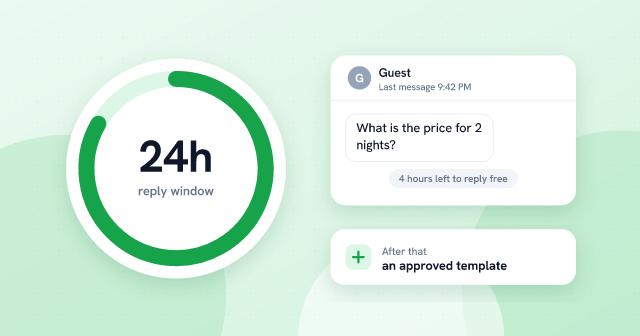
How to message a customer after 24 hours on WhatsApp
Count the 24-hour WhatsApp window correctly, write a follow-up template Meta can approve, and know what a follow-up costs since 1 October 2026.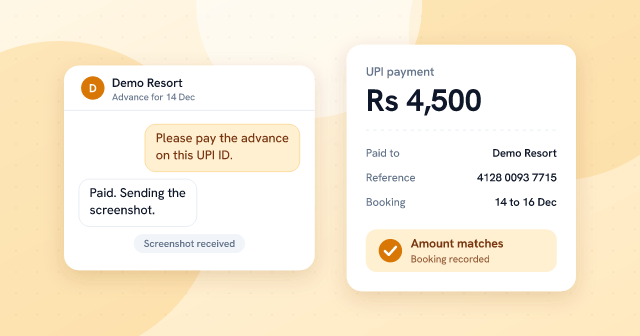 Payments
How to take UPI payment on WhatsApp and verify it
Share your UPI details, wait, check the credit in your own bank app, then confirm the room in writing. A routine your front desk can follow from tomorrow.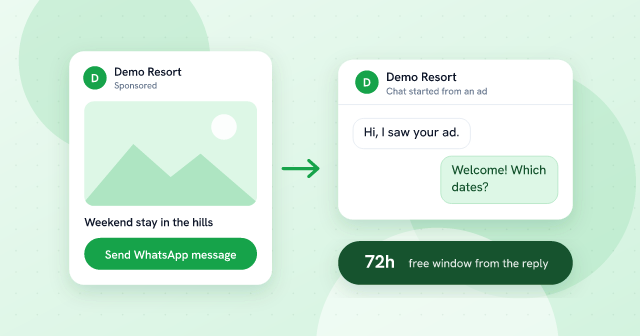 WhatsApp
Click to WhatsApp ads: how the 72-hour free window works
What opens Meta's 72-hour free window for ad-started WhatsApp chats, what it covers, how to set up the ad and how a hotel should reply.Get started now. Live in minutes.
Put an AI agent on your WhatsApp, Instagram and website, and let your team take over any chat.